

What is the Purpose of Form 8453-TE?
IRS Form 8453-TE (Tax Exempt Entity Declaration and Signature for Electronic Filing) is the official declaration and signature document used by tax-exempt organizations, trusts, and other covered entities when e-filing certain federal returns. It authenticates the return under penalties of perjury, authorizes an Electronic Return Originator (ERO) or an online filing provider—such as an Intermediate Service Provider (ISP) and/or transmitter—to submit the return to the IRS, and can authorize Electronic Funds Withdrawal (EFW) (direct debit) for eligible federal tax payments.
For organizations, CPAs, and tax professionals, this guide covers which returns require Form 8453-TE, how it evolved from Form 8453-EO, how it compares to Form 8879-TE, and how to complete and transmit every section accurately.
Which Forms Are Covered by Form 8453-TE?
Form 8453-TE is used when e-filing specific exempt-organization, trust, and related tax or information returns:
- Form 990 Series & Related Filings: Form 990, Form 990-EZ, Form 990-PF, Form 990-T, Form 5227, and Form 8038-CP.
- Other Returns & Extensions: Form 1120-POL, Form 4720, Form 5330, and Form 8868 (when filing with a payment).
Authorizing Direct Debit (EFW) for Federal Taxes Owed
When a covered return has a balance due or payment instruction, Form 8453-TE can authorize the U.S. Treasury to initiate an Automated Clearing House (ACH) electronic funds withdrawal for eligible forms—specifically Form 990-PF, Form 990-T, Form 1120-POL, Form 4720, Form 5330, or Form 8868 with payment. Filers must verify routing and account numbers, account type, debit amount, and intended debit date carefully so payments post cleanly without banking errors or late-payment penalties.
Rebranding and Evolution from Form 8453-EO to Form 8453-TE
Form 8453-TE replaced Form 8453-EO (Exempt Organization Declaration and Signature for Electronic Filing) following the Taxpayer First Act of 2019 (P.L. 116-25).
Prior to the Taxpayer First Act, mandatory e-filing for exempt organizations was narrower and largely centered on core filings such as Forms 990, 990-EZ, 990-PF, 1120-POL, and 8868. Enacted in July 2019, the Taxpayer First Act expanded mandatory electronic filing across a wider range of tax-exempt and government-related filings, including:
- Unrelated business income tax returns (Form 990-T)
- Excise tax returns (Forms 4720 and 5330)
- Split-interest trust returns (Form 5227)
- Certain bond credit payment claims (Form 8038-CP)
Renaming the form from 8453-EO to 8453-TE (“Tax Exempt Entity”) reflected this broader scope of tax-exempt and related entities subject to electronic filing.
How Tax-Exempt Organizations and Paid Preparers Use Form 8453-TE
Tax-exempt organizations and paid preparers use Form 8453-TE as a bridge between a physical or electronic signature and the IRS e-file system whenever they submit a return without using the Practitioner PIN method (Form 8879-TE).
How a Tax-Exempt Organization Uses Form 8453-TE
An organization uses Form 8453-TE either when self-filing online (via an IRS-authorized Intermediate Service Provider/Transmitter) or when approving a return prepared by a CPA or paid preparer:
- Authenticating the Return: An authorized officer (or person subject to tax) reviews the completed electronic return and signs Part II under penalties of perjury, confirming the return is true, correct, and complete.
- Authorizing E-File Transmission: If the organization is filing directly through an online filing provider rather than an Electronic Return Originator (ERO), signing Part II authorizes that provider (ISP/transmitter) to transmit the return to the IRS and receive transmission acknowledgments.
- Authorizing Direct Debit (EFW): If the organization owes taxes or extension payments (such as on Form 990-T, 990-PF, 4720, 5330, 1120-POL, or 8868), the officer enters the organization’s bank routing number, account number, debit amount, and payment date in Part II to authorize an Electronic Funds Withdrawal.
- Recordkeeping: After signing and returning the form to the transmitter or preparer, the organization keeps a copy of the signed Form 8453-TE and the IRS acceptance confirmation in its compliance records.
How a Paid Preparer (or ERO) Uses Form 8453-TE
Paid preparers and Electronic Return Originators (EROs) use Form 8453-TE to document client approval and legally attach the signed declaration to the e-file package:
- Preparing the Declaration: After generating the tax return, the preparer populates the header, checks the appropriate return box in Part I, and enters the designated summary figure (such as total revenue, total assets, or tax due) from that return.
- Obtaining Client Signature Before E-Filing: The preparer sends Form 8453-TE to the organization’s officer to sign and date Part II before the return is transmitted to the IRS.
- Completing Part III (Preparer / ERO Declaration): If the paid preparer prepares the return and the organization transmits it via an online filing provider (ISP/transmitter), the preparer signs and enters their PTIN and firm information in the Paid Preparer Use Only section of Part III, leaving the ERO section blank. If the firm is also acting as the ERO transmitting the return, the ERO completes the ERO’s Use Only section and checks the box indicating they are also the paid preparer.
- Scanning & Transmitting in XML: Once signed by both the officer and the preparer, the preparer (or online filing software) scans Form 8453-TE into a PDF, attaches it to the electronic return, references the PDF filename in the XML submission, and transmits it to the IRS (Form 8453-TE is not mailed separately to the IRS).
Form 8453-TE vs. Form 8879-TE: Key Differences
Both Form 8453-TE and Form 8879-TE (IRS e-file Signature Authorization for a Tax Exempt Entity) serve e-file signature and authorization functions for covered returns, but they fit different filing workflows.
| Feature / Workflow Point | Form 8453-TE | Form 8879-TE |
|---|---|---|
| Primary Workflow | PDF attachment workflow for paper-signed declarations or online provider filings. | PIN-based electronic signature authorization workflow. |
| Who Transmits | Can be transmitted directly via ISP/Transmitter or by an ERO attaching the PDF. | Transmitted by an ERO using Practitioner PIN or Self-Select PIN methods. |
| How Signature Is Captured | Manual or allowable electronic signature captured directly on the printed/PDF form. | Officer signs authorization giving ERO permission to enter PIN on entity’s behalf. |
| EFW / Direct Debit | Authorizes ACH electronic withdrawal directly within Part II. | Authorizes ACH electronic withdrawal via associated payment fields. |
Practical Note on EROs and EFINs: An ERO can also use Form 8453-TE in workflows where a signed declaration PDF is attached to the electronic submission. When an entity files online through an ISP/transmitter rather than an ERO, the filing provider’s Electronic Filer Identification Number (EFIN) and transmission details are transmitted in the XML rather than an ERO’s details. Always verify which signature route your software and preparer workflow require before transmitting.
Step-by-Step Breakdown of Form 8453-TE
Before filling out the three parts, complete the header at the top of Form 8453-TE—entering the tax year (or beginning and ending dates), legal name of the filer, and Employer Identification Number (EIN) or Social Security Number (SSN), as applicable. Make sure the entity name, tax period, and ID number match the e-filed return exactly.Special Rule for Form 8038-CP: When using Form 8453-TE to authenticate an electronic Form 8038-CP, enter the interest payment date from Form 8038-CP, Part III, line 18, in the period ending date field at the top of Form 8453-TE.
Part I: Type of Return and Return Information
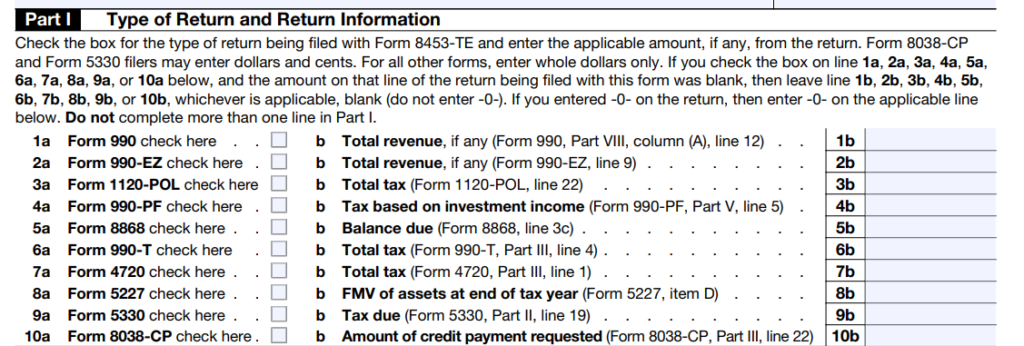
Part I identifies the exact return being electronically filed and records the designated key figure from that return:
- Check only one return checkbox corresponding to the return being filed with Form 8453-TE (e.g., Form 990, 990-EZ, 1120-POL, 990-PF, 8868, 990-T, 4720, 5227, 5330, or 8038-CP).
- Enter the corresponding amount from the specified line of that return (or -0- if zero).
- Whole Dollars vs. Cents: Most return lines in Part I must be entered in whole dollars only. Form 8038-CP and Form 5330 filers may enter dollars and cents. Do not complete more than one line in Part I.
Part II: Declaration of Officer or Person Subject to Tax
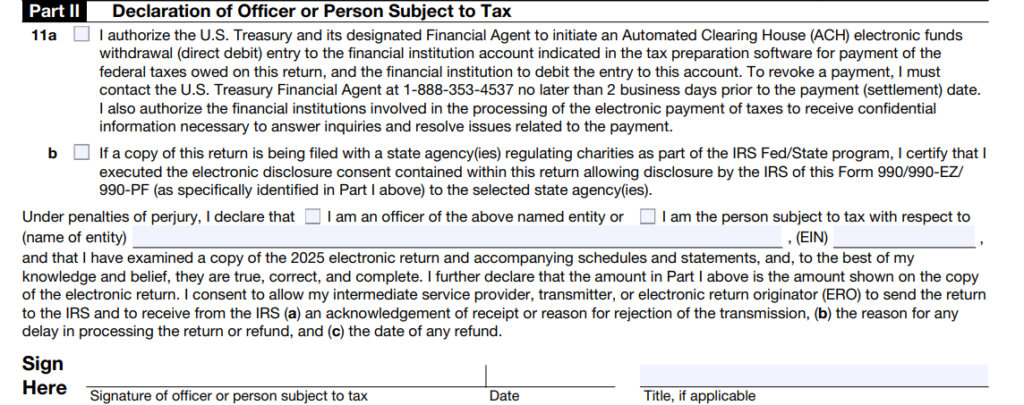
Part II is where the authorized organizational officer—or person subject to tax—certifies the return and handles payment authorization:
- Perjury Declaration & Authorization: The signer declares under penalties of perjury that they have examined the electronic return (and accompanying schedules and statements) and that it is true, correct, and complete to the best of their knowledge and belief. They also authorize the ISP/transmitter (if applicable) to send the return through a third-party transmitter to the IRS and receive acknowledgments.
- Electronic Funds Withdrawal (EFW): If electing direct debit, complete the EFW authorization fields—including routing number, account number, account type, debit amount, and requested debit date—and verify every digit carefully.
- Signer Details: Check the box indicating whether you are an officer or person subject to tax, enter the entity name and EIN, and provide the signature, date, and official title (if applicable).
Part III: Declaration of Electronic Return Originator (ERO) and Paid Preparer
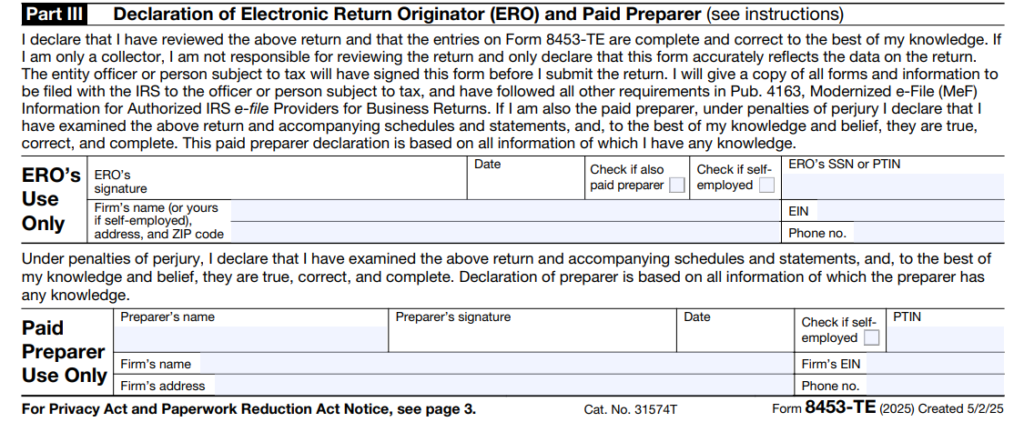
Part III covers the professionals involved in originating the e-file and/or preparing the return:
- ERO Section: If filing online through an ISP/transmitter without using an ERO, leave the ERO’s Use Only section blank. If filing through an ERO, the ERO declares that they reviewed the return and that the entries on Form 8453-TE are complete and correct, providing required ERO/firm details. If the ERO is also the paid preparer, check the box indicating they are also the paid preparer rather than filling out the paid preparer block separately.
- Paid Preparer Section: Anyone paid to prepare the return must complete the Paid Preparer Use Only section, including their PTIN, signature, date, and firm details (unless self-employed, as indicated).
How to File and Transmit Form 8453-TE
- Complete & Sign: Fill out the header, Part I, Part II (officer/person subject to tax signature and date), and applicable sections of Part III.
- Scan to PDF: Scan the completed, signed Form 8453-TE into a PDF file (do not paper-mail it as a standalone filing).
- Attach & Reference in XML: Your tax preparation software or online filing provider transmits the signed PDF as an attachment with the electronic return and references the document in the XML submission package.
- Retain Records: Keep the signed Form 8453-TE, IRS e-file acknowledgment, and any EFW payment confirmation in your tax compliance records so they can be produced if requested by the IRS.
Public Disclosure and Privacy Considerations (IRC Section 6104)
Under Internal Revenue Code (IRC) Section 6104(b), annual information returns filed by tax-exempt organizations and certain trusts—including Form 990, Form 990-EZ, Form 990-PF, and Form 5227—are open to public inspection. Because Form 8453-TE is transmitted as an attached PDF to authenticate the electronic return, it becomes part of the public inspection package when filed with a publicly disclosable return.
- What Becomes Publicly Visible: When Form 8453-TE is attached to a Form 990 series return, the IRS includes the signed PDF in its public release files. As a result, the organization’s legal name, EIN, the Part I summary figure, the signing officer’s name, title, signature, and date, as well as the paid preparer or ERO details in Part III, can appear in public nonprofit databases alongside the return.
- Protecting Banking Information and SSNs: Although Electronic Funds Withdrawal (EFW) bank routing and account numbers entered in Part II are suppressed from public disclosure copies released by the IRS, organizations should always review their public inspection copies before posting them on their own websites. In addition, organizations that have an Employer Identification Number (EIN) should always enter the EIN in the header rather than an individual’s Social Security Number (SSN).
- How Form 8879-TE Differs on Public Disclosure: When a tax-exempt organization files through an Electronic Return Originator (ERO) using the Practitioner PIN method (Form 8879-TE) instead of Form 8453-TE, Form 8879-TE is retained by the ERO and is not attached as a PDF to the e-file submission—meaning no separate signature form is published alongside the Form 990.