
Learn everything about IRS Form 8879-TE, including its purpose, the 10 tax forms it covers, step-by-step completion instructions, ERO responsibilities, and how it compares to Form 8453-TE.
Electronic filing is mandatory for most tax-exempt organizations and government entities under the Taxpayer First Act. When filing electronically through an authorized tax professional, organizations cannot apply a traditional wet-ink signature directly to an electronic transmission. Instead, the IRS requires Form 8879-TE (IRS E-file Signature Authorization for a Tax-Exempt Entity) to legally authenticate the return.
This guide covers the purpose of Form 8879-TE, the returns it supports, step-by-step filing instructions, Electronic Return Originator (ERO) compliance rules, and how it differs from Form 8453-TE.
What is the Purpose of Form 8879-TE?
Form 8879-TE serves as the official declaration and signature authorization between a tax-exempt entity (or person subject to tax) and an Electronic Return Originator (ERO). Specifically, it accomplishes three legal functions:
- PIN Signature Authorization: It allows an authorized officer or taxpayer to select or authorize a 5-digit Personal Identification Number (PIN) that serves as their legally binding electronic signature on the e-filed return.
- Declaration Under Penalties of Perjury: The signing officer confirms they have examined a copy of the electronic return and accompanying schedules, verifying that the financial figures in Part I match the return and are true, correct, and complete.
- Electronic Funds Withdrawal (EFW) Consent: When taxes are owed, Form 8879-TE authorizes the U.S. Treasury and its designated financial agent to initiate a direct debit from the entity’s designated bank account. It also permits the IRS to send transmission acknowledgments or rejection notices directly to the ERO.
Which Forms Are Covered by Form 8879-TE?
Form 8879-TE consolidates e-file signature authorizations for 10 distinct IRS tax and information returns used by nonprofits, private foundations, political organizations, trusts, and bond issuers.
| IRS Form Number | Form Title / Purpose | Financial Amount Reported in Part I |
|---|---|---|
| Form 990 | Return of Organization Exempt From Income Tax | Total revenue (Part VIII, col. (A), line 12) |
| Form 990-EZ | Short Form Return of Organization Exempt From Income Tax | Total revenue (Line 9) |
| Form 1120-POL | U.S. Income Tax Return for Certain Political Organizations | Total tax (Line 22) |
| Form 990-PF | Return of Private Foundation | Tax based on investment income (Part V, line 5) |
| Form 8868 | Application for Extension of Time To File an Exempt Organization Return | Balance due (Line 3c) |
| Form 990-T | Exempt Organization Business Income Tax Return | Total tax (Part III, line 4) |
| Form 4720 | Return of Certain Excise Taxes Under Chapters 41 and 42 | Total tax (Part III, line 1) |
| Form 5227 | Split-Interest Trust Information Return | Fair market value (FMV) of assets at end of tax year (Item D) |
| Form 5330 | Return of Excise Taxes Related to Employee Benefit Plans | Tax due (Part II, line 19) |
| Form 8038-CP | Return for Credit Payments to Issuers of Qualified Bonds | Amount of credit payment requested (Part III, line 22) |
| iNote: |
| A separate Form 8879-TE must be completed for each individual return being e-filed—do not check more than one box in Part I on a single form. |
ERO Responsibilities and Compliance Rules
An Electronic Return Originator (ERO) acts as the authorized IRS e-file provider who originates the electronic submission of a return. Form 8879-TE must be completed and signed before the ERO transmits the electronic return to the IRS.
When authorized by the taxpayer to enter their PIN, the ERO must enter their 6-digit Electronic Filing Identification Number (EFIN) followed by their 5-digit self-selected PIN in Part III, certifying that the submission complies with IRS Modernized e-File (MeF) standards.
Important Notes for EROs
- Do Not Mail to the IRS: Do not send Form 8879-TE to the IRS unless specifically requested to do so. Retain the completed Form 8879-TE for 3 years from the return due date or the date the IRS received the return, whichever is later. Form 8879-TE can be retained electronically in accordance with the recordkeeping guidelines in Rev. Proc. 97-22 (found on page 9 of Internal Revenue Bulletin 1997-13).
- PIN Authorization: Enter the taxpayer’s PIN on the software input screen only if you are explicitly authorized to do so by the officer or person subject to tax.
- Provide Copies on Request: Give a copy of the signed Form 8879-TE upon request to the entity or person subject to tax.
- Issue Corrected Copies for Changes: Give a corrected copy of Form 8879-TE to the entity or person subject to tax if changes are made to the return after initial review (for example, adjustments requested by the signing officer before transmission).
How to Complete Form 8879-TE (Step-by-Step)
Completing Form 8879-TE requires accurate alignment between the entity’s tax return and the authorization form:
Header Information
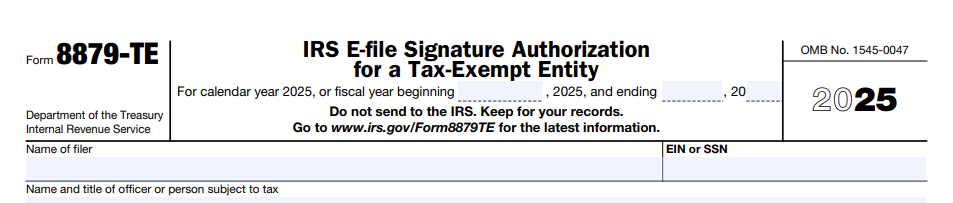
Enter the tax year beginning and ending dates, the exact name of the filer (entity or person subject to tax), the Employer Identification Number (EIN) or Social Security Number (SSN), and the name and title of the signing officer or taxpayer.
Part I – Type of Return and Return Information:
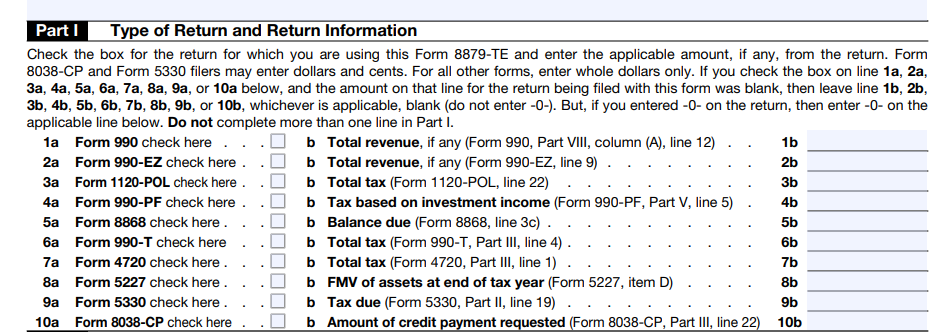
- Check the single box (1a through 10a) corresponding to the return being filed.
- Enter the corresponding dollar figure on the b line. Form 8038-CP and Form 5330 filers may enter dollars and cents; all other forms must use whole dollars only.
- Zero vs. Blank Rule: If the referenced line on the tax return was left blank, leave the line on Form 8879-TE blank. If -0- was entered on the tax return, enter -0- on Form 8879-TE.
Part II – Declaration and Signature Authorization:
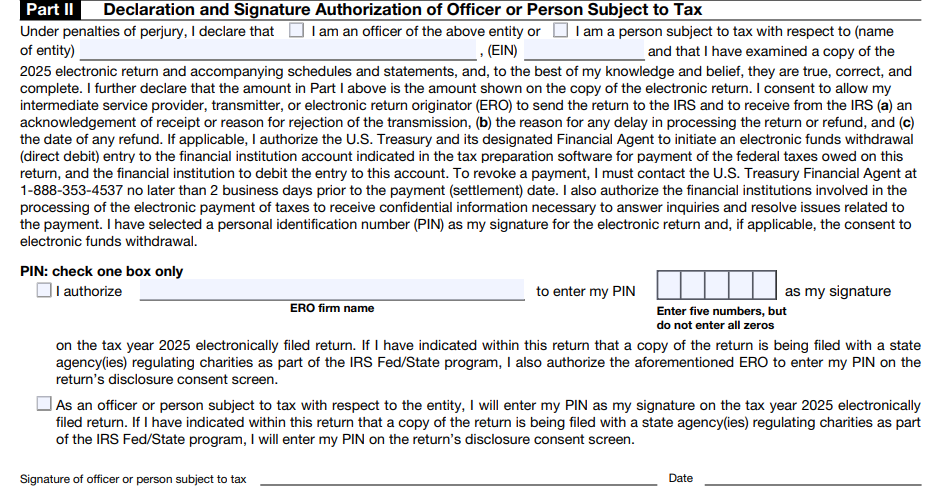
- The officer or person subject to tax checks the appropriate PIN authorization box.
- Option 1 (ERO Enters PIN): Check the first box, write the ERO firm name, and enter a self-selected 5-digit PIN (any five digits except all zeros) authorizing the ERO to input the PIN into the e-file software.
- Option 2 (Taxpayer Enters PIN): Check the second box if the officer or taxpayer will directly enter their 5-digit PIN into the electronic filing software themselves.
- The officer or person subject to tax signs and dates Part II.
Part III – Certification and Authentication (ERO Only):

- The ERO enters their 11-digit EFIN/PIN combination (6-digit EFIN + 5-digit ERO PIN, not all zeros).
- The ERO signs and dates Part III before transmitting the return.
Form 8879-TE vs. Form 8453-TE: What is the Difference?
Both Form 8879-TE and Form 8453-TE (IRS E-file Signature Authorization for a Tax-Exempt Entity) authenticate the exact same 10 tax-exempt returns, and EROs can legally use either form. However, they operate differently during e-file transmission:
| Feature | Form 8879-TE | Form 8453-TE |
|---|---|---|
| Primary Authentication Method | Uses a 5-digit PIN entered into the XML return data. | Uses a scanned PDF signature attached to the e-file. |
| Sent to the IRS? | No. Retained by the ERO for 3 years. | Yes. Must be scanned as a PDF and attached to the e-file transmission. |
| XML Data Mapping | The ERO’s EFIN and PIN (along with the taxpayer’s PIN) map directly into the return’s XML schema. | Online/direct filers or EROs map signature details in the XML while attaching the signed PDF copy of Form 8453-TE. |
| Who Can Use It? | EROs only (requires an EFIN). | Both EROs and online/self-filers filing without an ERO. |
Why EROs Prefer Form 8879-TE
While EROs can complete either form, Form 8879-TE offers a clear workflow advantage:
- Streamlined XML Submission: The ERO’s EFIN and PIN map directly into the return’s XML file, eliminating the need to scan, upload, and attach a signed PDF form to the e-file package.
- Reduced Transmission Errors: Because Form 8879-TE stays in the ERO’s internal records rather than being transmitted to the IRS, preparers avoid PDF attachment formatting rejections while maintaining full audit compliance through 3-year electronic retention.
- When Form 8453-TE is Required: Form 8453-TE remains necessary when an organization self-files online without an ERO (where the online filer’s PIN maps in the XML and the signed 8453-TE PDF is attached), or when an officer prefers signing a physical document for attachment rather than authorizing a PIN.
Frequently Asked Questions (FAQs)
Yes. The IRS permits electronic signatures (such as e-signature software) on Form 8879-TE, provided the ERO retains the signed authorization and audit trail according to IRS electronic recordkeeping standards (Rev. Proc. 97-22).
If changes are made to the return after the officer signs Form 8879-TE, the ERO must provide a corrected copy of Form 8879-TE to the entity. If the total revenue, total tax, or asset amount in Part I changes beyond IRS tolerance thresholds, a new Form 8879-TE must be signed before e-filing.
To cancel a direct debit tax payment authorized via Form 8879-TE, the entity must call the U.S. Treasury Financial Agent at 1-888-353-4537 no later than 2 business days before the scheduled settlement date.
Yes, a paid preparer can use Form 8879-TE if they are also an Authorized IRS e-file Provider acting as an Electronic Return Originator (ERO) with an active Electronic Filing Identification Number (EFIN). In Part II, they enter the ERO firm name, and in Part III, they sign with their 6-digit EFIN and 5-digit ERO PIN
A paid preparer who only holds a PTIN without an EFIN cannot use Form 8879-TE independently—they must either transmit the return through a designated ERO or have the organization self-file online using Form 8453-TE.